The Network Log: See Every Request the App Makes
Not a policy document — a list. Every outbound request is recorded with when, where to and why, for the last 30 days, readable inside the app.
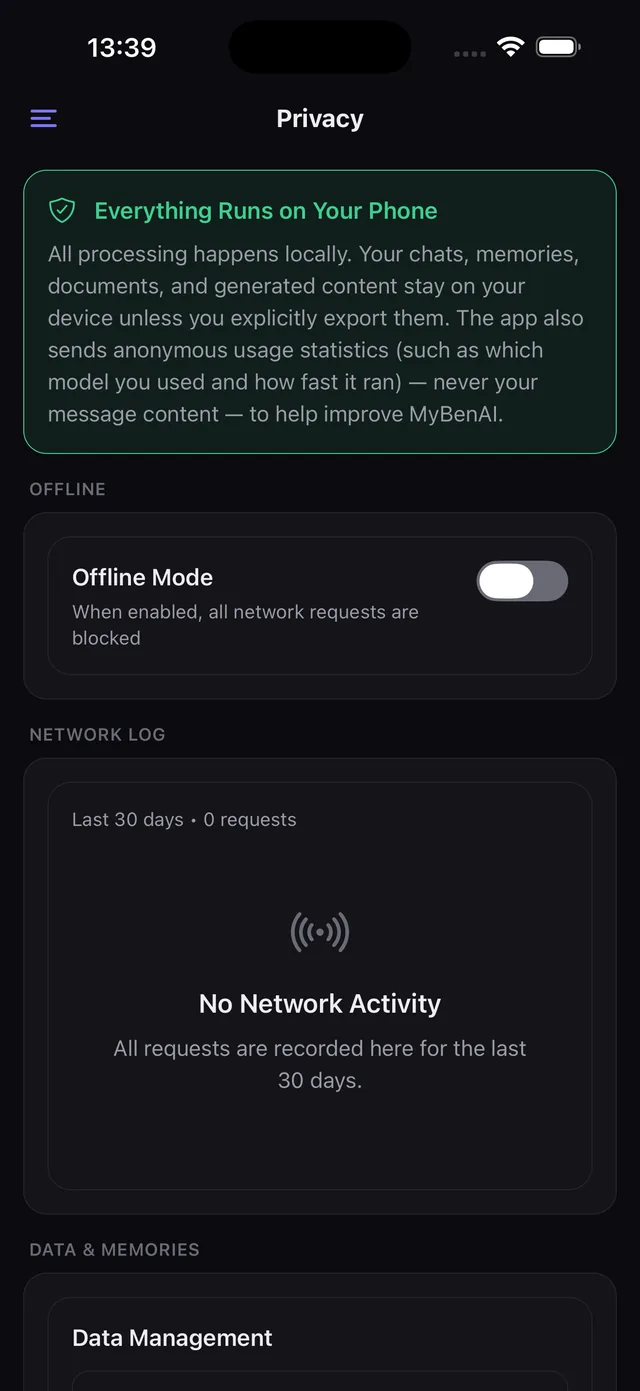
Every privacy policy asks you to trust it. This one asks you to look instead. The network log records every outbound request the app makes — when, where to, why, and how large — for the last thirty days, readable inside the app.
How it can be complete
Because the app is built so that it can be. Every network call in the core goes through one function that writes the log entry; calling the platform's HTTP client directly is banned by a lint rule rather than by convention. There is no second path for a request to take, which is what makes the log exhaustive instead of best-effort.
What you will see on it
Model downloads. Catalog refreshes. Searches you triggered and pages the model read. Connector calls you configured. Anonymous usage statistics, if you left them on. That is the list — and the screenshot above is a real device showing 0 requests in 30 days, which is what normal use of this app looks like.
What is not on it, because it never happens
Your conversations, your documents, your memories, your images, your voice. Those are processed by models on the phone; there is no request to log because there is no request.
Being precise about the statistics
MyBenAI does send anonymous usage statistics by default, and it says so on that same screen. They cover which model ran, how fast it ran, your device tier and RAM, OS and app version, and a random install identifier — never your message content. There is a switch to turn them off, and offline mode stops them along with everything else.
Looking for something else? Every page on this site.